- Published on
Intuna
- Authors

- Name
- reed
- @horsekey_sec
Context
Intune—I am not super familiar with it, but it made rounds in the news and I thought I would dig into a unique detection signal. When CISA released their alert referencing the use of Microsoft Intune for bad things: I assumed a lot worse things had happened—specifically with device scripts and remediations (malware via SCCM-esque), so I wanted to see if I could detect this happening myself.
Run it
To test it out myself, I joined a Windows 11 VM to my tenant, and created a crazy complicated platform script 🪄
echo "tunar fish" > C:\Windows\Temp\fishy-platform.txt
- go here
- click platform scripts
- add + select OS
- Name it, upload the script, set these options for quick tests
- Run this script using the logged on credentials: NO
- Enforce script signature check: NO
- Run script in 64 bit PowerShell Host: YES
- Add all devices
- Create
This will trigger some activity in Intune audit logs AND somewhere else :D
Detect it
This shows up under specific graph URIs which you can catch/hunt on using some KQL:
let company_ip_space = dynamic(["x.x.x.x/16"]);
MicrosoftGraphActivityLogs
| where RequestUri has_any ("deviceManagement/deviceManagementScripts","deviceManagement/deviceHealthScripts")
| where RequestMethod != "GET"
| extend IsInternalIP = ipv6_is_in_any_range(IPAddress, company_ip_space)
| where IsInternalIP == false or isempty(DeviceId)
Thankfully, this found me:
| TimeGenerated | RequestMethod | ResponseStatusCode | RequestUri | ResponseSizeBytes | DeviceId |
|---|---|---|---|---|---|
| 4/03/2026, 10:20:17.426 PM | POST | 201 | https[://]graph.microsoft[.]com/beta/deviceManagement/deviceManagementScripts | 512 | |
| 4/03/2026, 10:20:18.055 PM | POST | 200 | https[://]graph.microsoft[.]com/beta/deviceManagement/deviceManagementScripts/d3291050-08d2-44ce-aad4-ab5d98db86f8/assign | 0 |
Fix it
There will always be friction and maintenance with conditional access, but for specific directory roles like Intune Administrator, there are extreme risks (headlines) when not enforcing trusted locations, device compliance, and not having phishing-resistant MFA.
In their alert, CISA also recommended implementing multi-admin approval but I don't have experience using it.
If you can't do this for whatever reason, and you have graph activity logs, you should implement detections for activity from outside expected IP space and from unmanaged devices.
Host Artifacts
Scripts seem to land here on the host but are pretty quick to disappear:
C:\Program Files (x86)\Microsoft Intune Management Extension\Policies\Scripts\00000000-0000-0000-0000-000000000000_94c0fa15-8824-4dba-bc92-6ae4f735b5c5.ps1
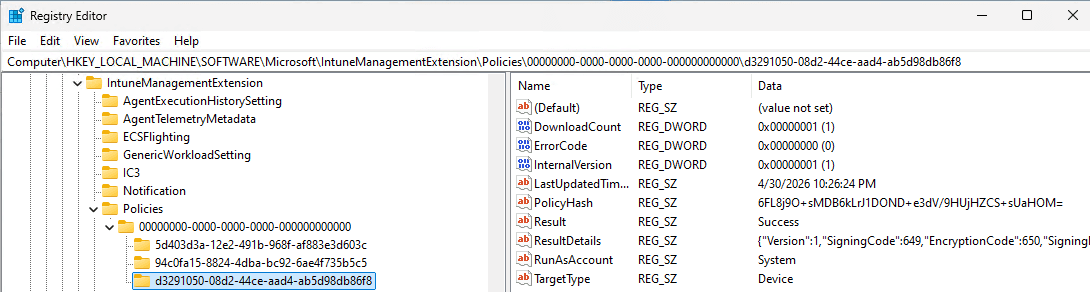
Here is where you can go in registry to see the status of a given policy.
Computer\HKEY_LOCAL_MACHINE\SOFTWARE\Microsoft\IntuneManagementExtension\Policies\00000000-0000-0000-0000-000000000000\d3291050-08d2-44ce-aad4-ab5d98db86f8
This matches up with context the script ran under (SYSTEM) and the policy ID within Intune.
Here's another log on the host that shows similar information.
C:\ProgramData\Microsoft\IntuneManagementExtension\Logs\IntuneManagementExtension.txt
You can open these logs in a much nicer view via CMTrace then view the encrypted contents with the key retrieved from something like Impacket's dpapi.py.
Anyways, thanks for readin'—stay safe out there, keyboard cowboy...